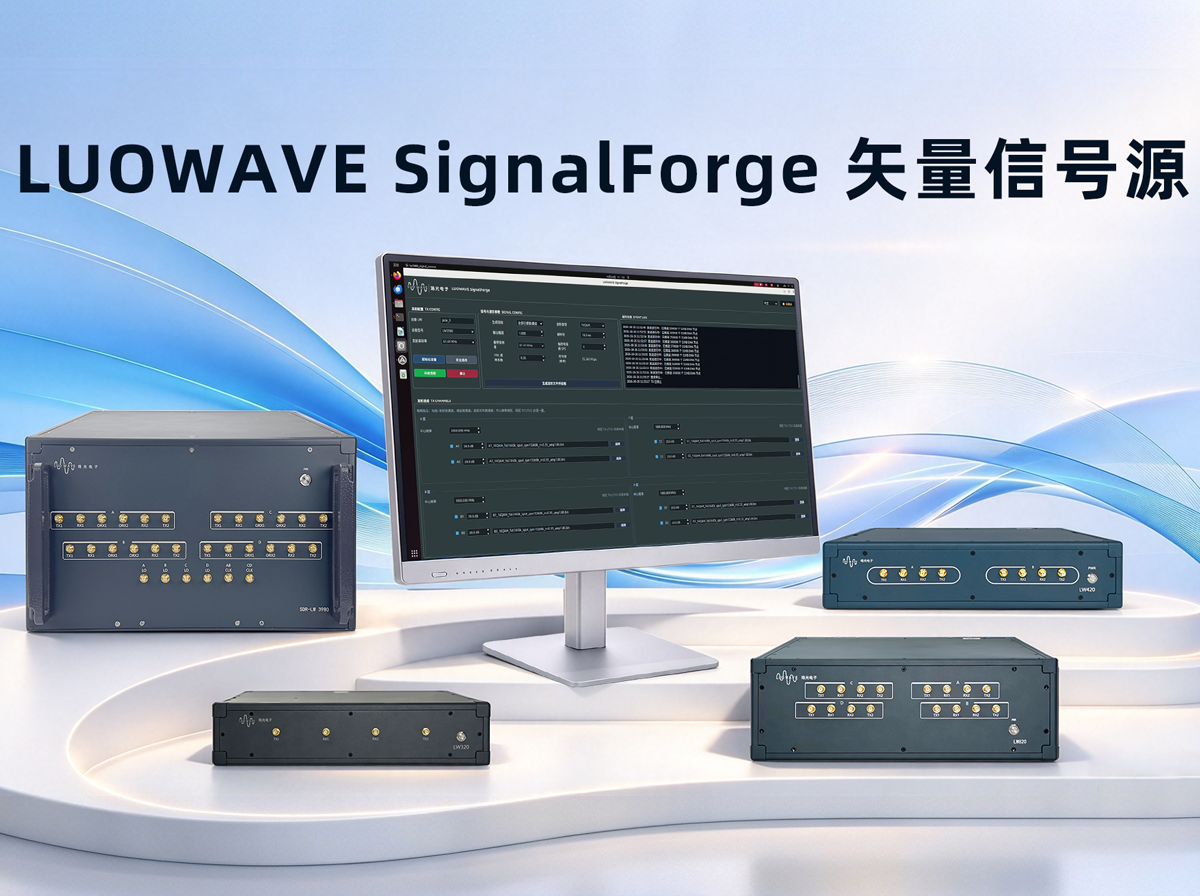
Receiver testing invariably starts with one prerequisite: a signal source that is well-defined and fully controllable. The conventional approaches either rely on expensive benchtop vector signal generators or require stitching together waveforms in MATLAB and then finding a way to push them onto the hardware;the former is constrained by channel count and cost, the latter by environment and real-time performance.LUOWAVE SignalForge (Vector Signal Generator) offers an alternative path: a Linux-based multi-channel vector signal generator software designed for the full range of LUOWAVE LW39x0 series devices (rack-mount SDR devices LW320 / LW420 / LW820 and standalone SDR laptop devices SDR-LW 3920 Note / SDR-LW 3940 Note / SDR-LW 3980 / SDR-LW 3980 Note), with a pure software signal chain that does not depend on MATLAB, UHD, or GNU Radio.
The software generates I/Q waveforms on the host side and streams them in real time to the RF front end via LUOWAVE's proprietary Luowave Driver and its C-code SDK. The main graphical interface integrates device configuration, waveform generation, eight-channel TX control, runtime status monitoring, and log management
;suitable for receiver testing, interference signal simulation, RF education, and communication algorithm validation.
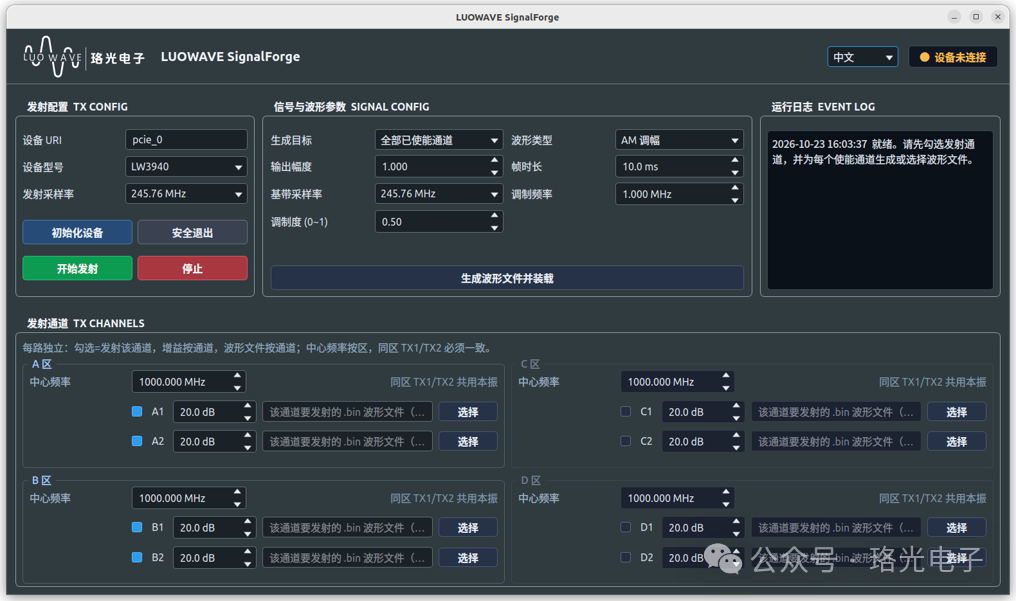
Nine Common Test Signal Types, Covering Most Validation Scenarios
The software includes six modulation types;AM, FM, BPSK, QPSK, 16QAM, and 64QAM;along with three specialized test signals:
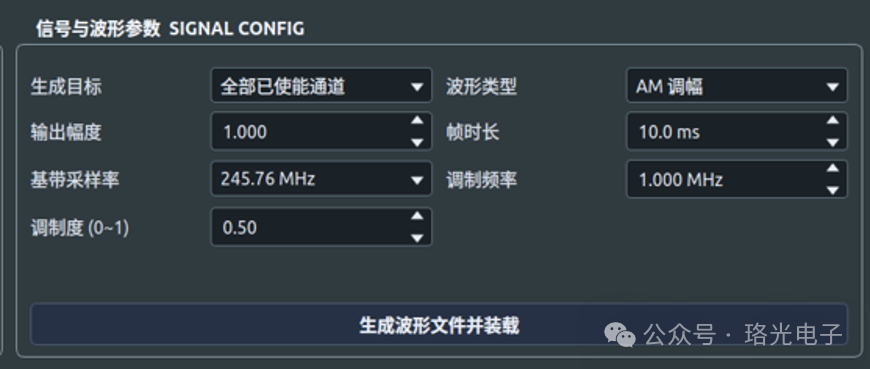
AM (Amplitude Modulation): Generates amplitude-modulated baseband signals. Configurable parameters include baseband sample rate, modulation frequency, modulation depth, frame duration, and output amplitude.
FM (Frequency Modulation): Generates continuous-phase frequency-modulated baseband signals. Configurable parameters include modulation frequency, maximum frequency deviation, baseband sample rate, frame duration, and output amplitude.
BPSK: Generates complex baseband signals shaped by a root-raised cosine (RRC) filter. Samples per symbol (SPS) and RRC roll-off factor are adjustable.
QPSK: Random bit sequence with Gray-coded constellation mapping, supporting EVM verification under matched filtering.
16QAM: Generates 16QAM complex baseband signals with independent baseband sample rate, SPS, roll-off factor, and output amplitude.
64QAM: Generates 64QAM complex baseband signals, suitable for high-order modulation/demodulation performance and Error Vector Magnitude (EVM) testing.
Barrage Noise: Generates band-limited complex Gaussian noise with configurable double-sided barrage bandwidth, used for receiver anti-jamming tests.
Swept Signal: Generates a linear continuous-phase Chirp signal with configurable start offset, stop offset, sweep period, and silence interval.
Comb Spectrum Signal: Generates multiple spectral combs in the frequency domain with random phase assignment. Configurable parameters include comb spacing, number of combs, and per-comb bandwidth.
Beyond the Nine Built-in Types;No Limits
These are only the signal types built into the software. If your testing requires other waveforms, you can fully design your own;generate I/Q data on the host side, save it as a waveform file, and load it directly into the designated channel for transmission, using the same transmission chain as the built-in signals.
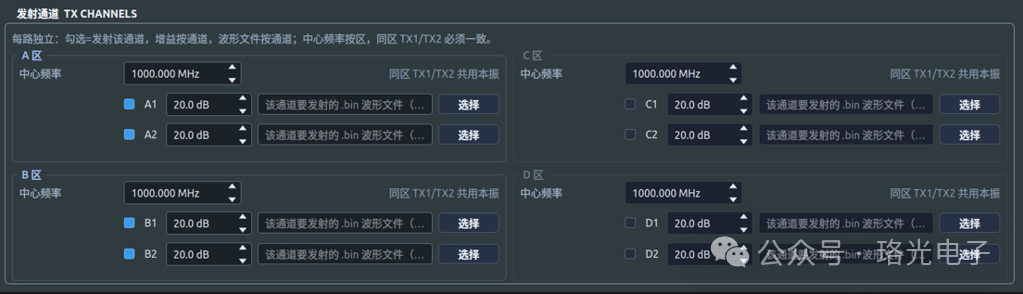
Eight TX Channels with Independent Control, Shared LO per Zone
Channel capabilities are tiered by device model, all covered by the same software:
LW320 / SDR-LW 3920 Note (2T2R): Supports Zone A channels
LW420 / SDR-LW 3940 Note (4T4R): Supports Zones A and B
LW820 / SDR-LW 3980 / SDR-LW 3980 Note (8T8R): Full support for Zones A/B/C/D, eight TX channels
Center frequency is set per zone; TX1/TX2 within the same zone share a local oscillator (LO). The four zones can each be set to different center frequencies, meaning a single device can simultaneously cover multiple frequency bands. Each channel features independent enable selection, independent gain control, and independent waveform file loading;configure multi-channel parallel testing once, and it is ready to run.
Waveform Generation and Loading in One Step, with Pre-Transmission Auto-Validation
Three Steps to Complete the Operation
The complete workflow requires only three steps:
Step 1: In the "Signal & Waveform Parameters" area, select the generation target and waveform type, then configure the baseband sample rate, frame duration, output amplitude, and signal-specific parameters;
Step 2: Click "Generate Waveform File & Load";the software generates the waveform per channel and delivers it to the target channel;
Step 3: Click "Initialize Device" to establish the SDK context, then click "Start Transmission."
Pre-Transmission Auto-Validation
Before "Start Transmission" is executed, the software automatically checks channel switches, waveform files, TX sample rate, and the consistency between the composite sample rate and the TX sample rate. If validation fails, transmission will not start;this prevents the kind of silent error where "the signal is transmitted, but the spectrum is wrong."
Real-Time Parameter Adjustment During Transmission
During actual test debugging, there is no need to frequently interrupt the transmission:
Adjust on the fly: Center frequency for each zone and TX gain for each channel can be modified directly during transmission. Changes are applied after a 250 ms debounce delay;no need to stop and restart the entire workflow;
Structural parameters require stop-then-modify: Channel enable, TX sample rate, waveform type, and other waveform parameters must be modified after stopping transmission, then re-transmitted.
Flexibility and stability;clearly separated.
Safe Exit + Runtime Log
Click "Stop" to end the current transmission; when exiting the program, please use "Safe Exit"; the software will sequentially stop the transmission thread, stop TX DMA, and release device resources, preventing state residue from abnormal exits.
Runtime status and error messages are displayed in real time in the "Runtime Log"; whether the link is normal or where it got stuck, the log tells the full story.
Companion Validation Tools;Self-Check Before Deployment
In addition to the graphical interface, the software provides command-line waveform generation, offline quality inspection, and TX→RX loopback validation tools. The correctness of the signal chain can be fully verified before deployment;rather than discovering issues on-site.
Key Features of SignalForge
1. Eight TX Channels with Independent Control
Tiered by zone to cover the full 2T-to-8T device lineup. Each channel features independent enable, independent gain, and independent waveform loading. Shared LO within a zone, independent center frequency across zones;a single device can cover multi-band parallel testing.
2. Nine Test Signal Types + Custom Waveform Extension
Six built-in modulation types and three specialized test signals cover most validation scenarios. Waveforms beyond the built-in library can be generated as custom I/Q files and loaded for transmission, using the same transmission chain as built-in signals.
3. Pure Software Signal Chain, Linux-Native
Built on LUOWAVE's proprietary Luowave Driver and C-code SDK, the entire chain;from waveform generation to RF transmission;is implemented purely in software, with no dependency on MATLAB, UHD, or GNU Radio.
4. Real-Time Parameter Adjustment During Transmission
Center frequency and TX gain can be modified directly during transmission, applied after a 250 ms debounce delay;no stop/restart required. Structural parameters are modified after stopping, then re-transmitted. The boundary between flexibility and stability is clearly defined.
5. Auto-Validation + Companion Tools
Pre-transmission auto-check of channel, waveform, and sample rate consistency;no transmission if validation fails. Companion command-line waveform generation, offline quality inspection, and TX→RX loopback validation tools enable full self-checking before deployment.
Conclusion
Eight TX channels with independent control, nine test signal types covering most scenarios, real-time parameter adjustment during transmission, and a Linux-native implementation;SignalForge addresses a very specific problem: turning "generating a test signal" from an engineering task into a few simple steps. The entire software is built on LUOWAVE's proprietary Luowave Driver and SDK, deeply optimized for in-house SDR hardware, fully unlocking multi-channel synchronization and low-latency transmission performance. We will continue to iterate on features and refine the SDR software ecosystem.
Learn More About SignalForge
For more information on the LW39x0 series devices, to obtain the software, or to schedule a demo, please contact the LUOWAVE technical team for technical documentation and trial information.